Integrated Messengers
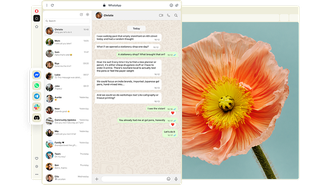
Conversations are where new ideas begin. Your Opera browser integrates messengers in the sidebar, so you can keep the discussions that matter right alongside your work. See more
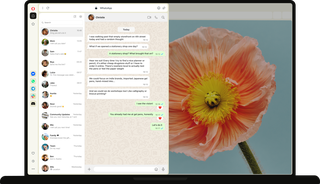
Opera browser with a conversation in sidebar.

Bring in the people that matter

Keep conversations close

Working on something together? Keep the discussions and ideas in reach.

Make calls, send quick replies, and share files right from your Opera browser’s sidebar. No extensions, no extra apps, and no reaching for your phone.

WhatsApp icon in Opera sidebar next to a chat about brainstorming ideas for a budgeting app.

Reach all your circles

A client pitch, group project, and family holiday plans call for a different crowd.

Select WhatsApp, Slack, Discord, Messenger, or Telegram in your sidebar, and keep the discussions docked right next to the right tabs.

Sidebar setup panel letting users toggle Messenger, WhatsApp, Telegram, Slack, and Discord on or off.

Control your social battery

One minute you’re deep in a creative brainstorm, and the next you need some quiet.|

Pin the messenger you’re using alongside your work to stay in the loop. Unpin it and mute notifications until you're ready to continue the conversation.

Discord icon with notification badge in Opera sidebar, with options to mute or hide the panel.

Move things forward

Hand off a task to a teammate, send a client a draft, remind everyone about Grandma’s birthday, or lock in the dates for a bike trip with friends.

Sidebar messengers let you answer in stride and keep group work moving, turning conversations into action without leaving the page you’re on.

Slack in Opera sidebar showing a notification with a shared presentation link.

Get more done together

Someone in your Discord coding community posts the fix you’ve been looking for. A colleague on WhatsApp sends over photoshoot assets just as you’re building the layout.

When useful stuff comes in, it’s right there beside your work. Check the images, grab the files, test the code, and keep going without reaching for your phone or switching apps.

Messenger chat in Opera sidebar showing a shared photo, with an image library open in the browser.

Keep up with everything

You’re working on a project when a Slack update changes things, a group chat in Facebook’s Messenger confirms a booking for August, and a friend sends you an article to read later.

See what’s changed, what needs your attention, and what can wait, all while you keep working. Handle multiple conversations at once and stay focused on what you’re doing.

WhatsApp notification in Opera sidebar next to a Messenger group chat planning a hiking trip.

Your stack of built-in messengers

WhatsApp

Stay in touch with family, friends, and groups. Share photos, send voice notes, make calls, and keep everyday plans moving.

Slack

Make progress with your team. Chat in channels, share files and updates, and get quick answers without leaving your browser.

Messenger

Catch up with your Facebook friends, all at once. Send direct messages, make plans, share updates, and keep group chats going.

Discord

Hang out with the people who share your interests. Join servers, chat in text or voice channels, play games, and study together.

Telegram

Follow public channels for niche interests and everyday conversations. Join communities, message friends, and share media.

Here’s what others have to say

WhatsApp

“It makes it easier to talk to my friends this way”


Opera user from Belgium

Facebook Messenger

“Talking to family and friends is more convenient and I don’t have to grab my phone or open a new tab.”


Opera user from Philippines

Telegram

“This is such a useful function, because you can open anything you need in just one click”


Opera user from United States

WhatsApp

“I like this feature because I don't need to have another tab opened.”


Opera user from Brazil

Telegram

“This feature is a great alternative to the desktop version.”


Opera user from Ethiopia

Facebook Messenger

“It's super efficient and not so time consuming!”


Opera user from Romania

01
Make things happen with others in Opera

Make things happen with others in Opera

Tab Islands

Group related tabs to save space and switch contexts easily.

Ad Blocker

Block ads and browse the web with fewer interruptions.

Free VPN

Browse with added privacy using Opera’s built-in VPN.

Opera AI

Chat, create, and analyze tab content with built-in AI assistant.

Workspaces

Organize tabs into separate spaces for different tasks.

Split Screen

View multiple pages side by side to multitask and compare.

Vertical Tabs

See page titles clearly and find the tabs you need.

Search in Tabs

Search your open tabs by keyword to find the one you need.

Tab Emojis

Personalize your tabs with emojis for easy recognition.

Easy Files

Upload recently downloaded files without searching.

Browser AI

Support your work with built-in Opera AI, ChatGPT, and Gemini.

AI Image Generator

Create stunning AI images from text prompts for free.

Integrated Social Media

Get instant access to X, TikTok, Bluesky, Twitch, and Instagram.

Translate in Opera

Translate entire pages or selected text with one click or automatically.

Google Services

Keep Gemini, Gmail, Calendar and Google Translate close at hand.

WhatsApp

Bring WhatsApp to your computer.

Slack in Opera

Stay on top of team conversations without leaving your workspace.

Messenger

Stay in touch with friends without interrupting what you’re doing.

Discord in Opera

Stay connected with your Discord communities in Opera’s sidebar.

Telegram Messenger

Chat in Telegram on desktop in the Opera browser.

Instagram

Check DMs, catch up on stories, and watch reels in the sidebar.

X

Follow breaking conversations and trending tweets faster.

Bluesky in Opera

Discover new voices and communities right from your sidebar.

TikTok in Opera

Watch your feed and upload videos without opening another tab.

Music Player

Access your favorite music and podcasts from Opera’s sidebar.

Spotify

Access Spotify playlists and control playback as you browse.

Deezer

Stream your favorite Deezer tracks without interrupting your browsing.

YouTube

Enjoy your favorite YouTube videos right from Opera’s sidebar.

Video Popout

Watch videos in a floating window while you browse other tabs.

Lucid Mode

Enhance online videos and images in one click.

Volume Booster

Increase your browser volume by up to 500% natively.

Opera VPNs

Browse with an extra layer of privacy using Opera’s built-in VPN.

Personal News

A customizable and convenient newsfeed on your start page.

Opera Themes

Completely transform the look, sound and feel of your browser.

Battery Saver

Browse longer on your laptop with less battery drain.

VPN Pro

Get enhanced privacy for your entire device with 48 VPN locations.

Unit Converter

Convert currencies, time zones, and measurements in one click.

Opera Cashback

Automatically get money back when shopping in Opera.

Snapshot

Capture, edit and share snapshots of webpages.

Opera Bookmarks

Save your favorite websites for quick and easy access.

Opera Sync

Sync your open tabs, bookmarks, history, and more across devices.

Flow

Send files, links, and notes between your devices instantly.

Pinboards

Collect visual web content and share your favorite finds.
01

Ready to start something new?

Begin your next idea with Opera
Ready to start something new?