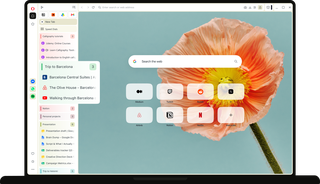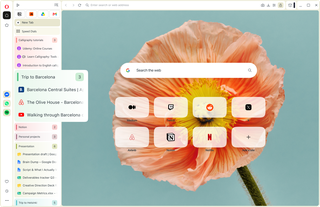
See every tab.
Start something bigger.
Make room
Move your tabs to the side and make the most of your screen.

See everything
See the full title of every page, so the next tab is always easy to find.

Switch easily
Move between tabs and projects smoothly, without searching.

See each tab
When researching online, every new tab is an important piece of the puzzle. And you don’t want to get overwhelmed.
Vertical Tabs keeps every page title visible, letting you keep your train of thought without pausing to search through tabs.

Watch ideas take shape
A single idea can quickly branch into articles, documents, comparisons, and just one more tab.
Tab Islands works just as well in a vertical layout, grouping related tabs and letting you customize their colors and names.

Switch instantly
Your browsing doesn't always stop when a meeting begins, and you don’t want to scramble to switch back.
Vertical Tabs highlights your active video tabs, so you can quickly jump back to your conversation when you’re needed.

How to use Vertical Tabs
Open Easy Setup (three-line icon in the top right) and turn on Use vertical tab strip.
You can also right-click any tab and choose Use vertical tab strip. Your tabs will instantly move to the left side of the browser.
Move between horizontal and vertical tabs whenever you like. Turn Use vertical tab strip on or off in Easy Setup, or right-click any tab and choose Use horizontal tab strip to switch layouts.
Your tab islands, workspaces, and pinned tabs are exactly as you left them when you switch back.
Need more screen space? Click the Collapse panel icon in the top-left to make more space, and expand it again whenever you're ready.
Active calls, videos, and music are marked with a speaker icon, making it easy to jump back whenever you need them.
Create, rename, recolor, and collapse tab islands within the vertical layout to keep related pages together.



See every tab
Ready for something new?