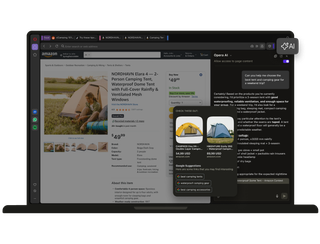
Opera AI
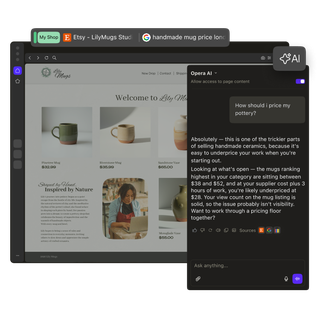
Start with an idea.
Take it further with Opera AI.
Skip the log-in
Get full AI support for free, with no log-in or sign-up needed. Just type a question to Opera AI for fast answers, and move forward with your idea.
Work in context
Skip the long explanations. Opera’s AI understands your current page or tab group, so you get smart contextual answers from minimal prompts.
Make it visual
See your ideas made real. Opera’s AI Image Generator creates free, high-quality images in seconds, so you can visualize your next step and keep creating.

Get straight to it
When an idea strikes, you want to make real progress with nothing in your way.
With Opera AI, you can skip the sign-up. You get free immediate access to the best models from OpenAI and Google in one place.
Opera’s agentic AI can give you instant contextual answers based on the pages you’re on, saving you from typing long prompts with details and background.

Extract the key points
To make progress, you need to focus on thinking and deciding, not sifting through mountains of information for reliable insights.
You don’t even need to switch between tabs. Opera AI can quickly summarize keypoints from multiple pages, or analyze files like reports, PDFs, spreadsheets, and documents, to deliver the key data you need.
Plus, Opera AI also supports voice input and output, so you can continue working while speaking with it.

Dig deeper
When you’re researching or comparing, you need to feel confident in every piece of data you collect.
Because Opera AI understands the context of your tabs, it can quickly compare pages, summarize information, and find reviews or missing pieces, with direct links to sources.
And with direct access to YouTube transcriptions, Opera AI can translate, summarize, or search through videos for specific details, so you don’t have to watch the whole thing.

Help your creative process
AI is no match for human creativity, but it can give it a nudge with useful feedback and mockups.
Before taking your idea further, create a visual moodboard with Opera AI’s free AI image generation, and upload drafts, sketches or scripts for helpful suggestions.
Another set of eyes can give fresh perspective on creative projects, and AI can do the same without you showing others your idea too soon.

Always by your side
Big life changes, like starting university, landing a new job, or adopting a pet, all have steep learning curves. But Opera AI is always available to help with your next challenge.
Click AI in Opera’s top-right corner to open the side panel and get quick answers, helpful suggestions, or even emotional support when you need it.
You can also highlight any webpage text and select Explore more or Translate. This gives you quick AI explanations, or translations into 50 languages, without you typing a single word.
See why Opera AI is a game changer

How to use Opera AI
Click the Ask AI button in the top-right corner of your Opera browser. You can also use the shortcut Ctrl+O (Windows) or Cmd+O (macOS).
With Opera AI open, ask questions about the page you're viewing to get summaries, explanations, or deeper insights. You can also ask about all the tabs within the same tab island.
Simply describe what you imagine using natural language, and Opera’s generative AI will create it for you.
Upload images or documents to ask questions, get summaries, compare content, or extract key information.
Highlight text on any webpage and choose Explore more or Translate to get instant AI insights.


Discover more


Begin with answers in the Opera browser
Ready to start something new?