Snapshot in Opera GX

Basic screenshots or ready to go pro. Turn simple screen grabs into shareable masterpieces with just a few clicks. Lihat selengkapnya
Snapshot in Opera GX Snapshot in Opera GX

Snapshot in Opera GX

Capture, edit, and share screenshots with ease, right in Opera GX.

Built-in brilliance

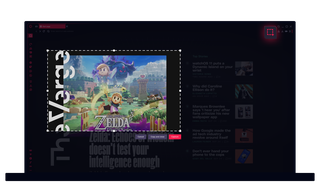
Just press Ctrl+Shift+5 (Command+Shift+2 on Mac) or tap the Snapshot toolbar icon, and you're ready to snap.

Perfectly precise

Capture exactly what you need. Frame it, grab it, and get on with your day. Need the whole page? One click, and it’s yours.

Fun & functional

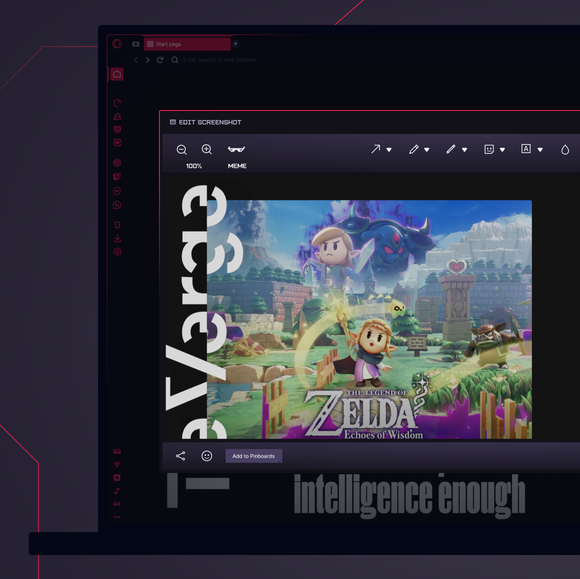
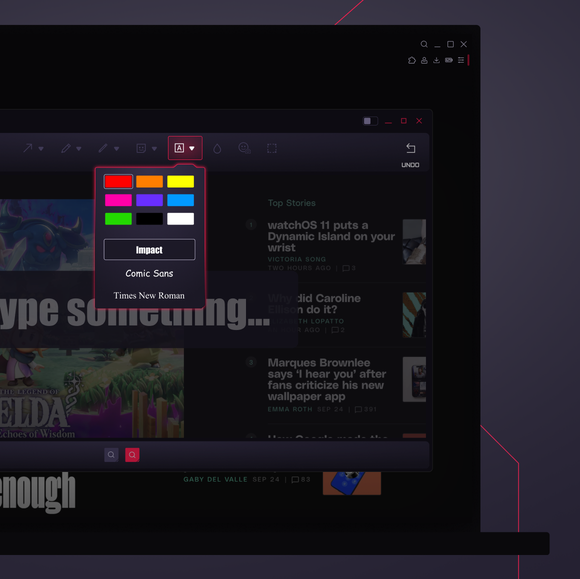
Turn screenshots into memes, notes, or edits. Add arrows, text, or blur. Creativity or privacy, it’s your call.

For busy minds

Take a snap, add your flair, and share it, without switching tools. GX keeps everything right at your fingertips.

01
Get the most out of Snapshots Get the most out of Snapshots

Get the most out of Snapshots

GX Control

Boost frames, not fan speed, with CPU and RAM limiters.

GX Mods

Completely customize your GX browser.

Integrated Twitch

Stream on. Twitch lives right in Opera GX.

Integrated Discord

Stay connected to your squad at all times.

Ad Blocker

Your time is epic. Get to the stuff that matters, quicker.

YouTube Music

Soundtrack untuk apa pun yang ada di layar Anda.

Pemutar Musik

Semua musik dan podcast favorit Anda di satu tempat.

Apple Music

Listen to your favorite tracks while you browse.

Spotify

Fuel your browsing with your favorite tunes.

Deezer

Music right where you work (and play).

Tidal

Find your sound. Get inspired with Tidal.

Suara keyboard

Bunyi keyboard khusus pada setiap ketukan.

GX Corner

Games, releases, news and deals in your corner.

Bluesky

Bluesky di browser Opera GX Anda.

Kendur

Lebih sedikit beralih. Lebih banyak melakukan. Kendur di GX sekarang.

Messenger

DM tetap terbuka sementara Anda fokus pada hal lain.

Telegram

Geser ke dalam DM tanpa meninggalkan permainan.

Browser Profiles

Profiles of each of your personalities.

X di browser

Tweet di tengah pertandingan, tidak perlu beralih tab.

Utusan

Permainan dimulai, mengobrollah! Bicara tanpa harus menutup tab.

Video Popout

Watch in a floating video window while you browse.

Bookmarks

Your favorite spots, remembered and ready.

WhatsApp

Jaga agar percakapan tetap berjalan saat Anda menjelajah.

Instagram

Gulir gulungan dan pos tanpa melewatkan satu ketukan pun.

Vkontakte

Mengobrol di VK sambil bermain game, menjelajah, atau streaming.

TikTok

Menonton Tiktoks sambil bermain, mengedit, atau menjelajah.

Pinboards

Pin it, plot it, post it. Grab and stash your gems.

Agregator Kesepakatan Game

Dapatkan diskon game top dengan cepat, langsung di tempat Anda bermain.

Release Calendar

Never miss out on new game drops.

Split Screen

Double the view, half the mess in GX.

Tabs

Group and control your tabs with zero tabxiety.

VPN gratis untuk Mac

Jelajahi secara pribadi di perangkat Mac dengan GX.

VPN gratis untuk Windows

Jelajahi secara pribadi di Windows dengan VPN Gratis.

Browser Games

Turn your browser into your playground.

Game Trailers

See upcoming games, straight from the source.

Custom Cursors

Make every click unmistakably yours.

Kepulauan Tab

Tab overload? Dominasi dengan Tab Islands.

Opera Translate

Baca situs apa pun dalam bahasa Anda.

Emoji Tab

Tambahkan beberapa bakat pribadi ke tab Anda.

Personal News

Get important news right in your sidebar.

GX Network Limiter

Control your GX browser’s bandwidth.

Live Wallpapers

Ditch the dull. Inject some life into your desktop.

Shaders

Apply visual filters across all websites.

Background Music

Silence is boring. Dynamic music adapts to you.

Force Dark Pages

Dim the lights, turn up the style.

Fake My History

Replace your guilty pleasures with wholesomeness.

RGX Mode

Free your eyes from mediocrity with HD visuals.

Panic Button

F12 to purge. Keep your secrets in one click.

Battery Saver

You’ve got the power. Opera GX extends your battery life.

Workspaces

Tab groups. Switch between different contexts in a jiffy.

Flow

Berbagi file, tautan, dan pemikiran di semua perangkat.

GX Cleaner

Exchange your browser’s rubbish for speed.

VPN gratis

Privasi tanpa kompromi, tanpa pamrih.
01

How do I take a screenshot in Opera GX?

To take a screenshot in Opera GX, simply press Ctrl+Shift+5 (Command+Shift+2 on Mac), or tap the Snapshot icon on your toolbar to launch Snapshot. Select and crop the part of your screen you wish to capture. Instantly edit with doodles or text, then save or share. No extensions needed.

How do I take a full-screen screenshot?

With the Snapshot tool open in Opera GX, look for the visible-page capture option. This will capture your whole screen, nothing left out. Once the screenshot is taken, you can crop, annotate and share in seconds.

How do I quickly share or save a screenshot

In the Opera GX browser, press Ctrl+Shift+5 (Command+Shift+2 on Mac) to open Snapshot. When you take a screenshot and select Capture, a preview of the screenshot will appear with a Save button in the bottom-right, and a Share button in the bottom-left.

Anda berhak untuk browser yang lebih baik
VPN gratis Opera, Pemblokir iklan, dan berbagi file Flow. Hanya beberapa fitur yang harus dimiliki yang ada di dalam Opera untuk penjelajahan yang lebih cepat, lancar, dan bebas gangguan yang dirancang untuk meningkatkan pengalaman online Anda.
Anda berhak untuk browser yang lebih baik Anda berhak untuk browser yang lebih baik