Background Music in GX

Background Music matches your tempo in Opera GX. Perfect for those moments when silence is just too loud. 了解更多
Background Music in GX Background Music in GX

Background Music in Opera GX

Create music by browsing in Opera GX. Background music adapts to your browsing actions.

Ambient music

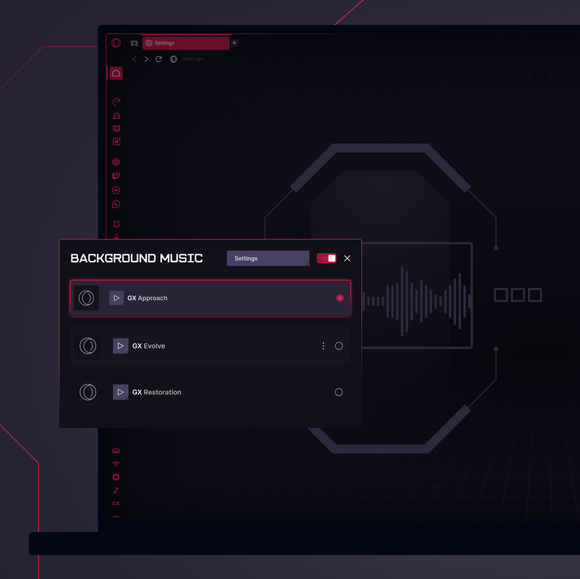
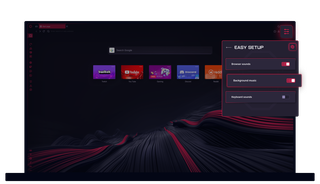
Get immersed in the ambient downtempo soundtrack of Opera GX. Go to Background Music in Settings (Alt+P), and select your sounds.

Dynamic sounds

Background Music adapts to your browsing actions. Feel the intensity rise as you type and click, and mellow out as you scroll and read.

All your moods

Your soundtrack follows your lead. From pulsating beats at work to soothing tunes as you unwind, it's the perfect backdrop for any activity.

All the mods

Go to the GX Store for endless browser mods, including custom tracks for your Background Music from the rakish GX community.

01
Silence is boring Silence is boring

Silence is boring

GX Control

Boost frames, not fan speed, with CPU and RAM limiters.

GX Mods

Completely customize your GX browser.

Integrated Twitch

Stream on. Twitch lives right in Opera GX.

Integrated Discord

Stay connected to your squad at all times.

Ad Blocker

Your time is epic. Get to the stuff that matters, quicker.

Snapshot

Frame it, capture it, and move on easily.

YouTube Music

为屏幕上的任何内容配乐。

音乐播放器

将您最喜爱的音乐和播客集于一身。

Apple Music

Listen to your favorite tracks while you browse.

Spotify

Fuel your browsing with your favorite tunes.

Deezer

Music right where you work (and play).

Tidal

Find your sound. Get inspired with Tidal.

键盘声音

每次敲击都能发出自定义键盘声音

GX Corner

Games, releases, news and deals in your corner.

蓝天

在 Opera GX 浏览器中使用 Bluesky。

松弛

减少切换。多做事。现在在 GX 中松懈下来。

信使

当你专注于更多事情时,DM 保持开放。

电报

无需离开游戏即可进入 DM。

Browser Profiles

Profiles of each of your personalities.

浏览器中的 X

无需切换标签,即可在比赛过程中发布微博。

信使

游戏继续,聊天继续!聊天不卡顿

Video Popout

Watch in a floating video window while you browse.

Bookmarks

Your favorite spots, remembered and ready.

WhatsApp

在浏览的同时保持对话。

Instagram

不失时机地滚动卷轴和帖子。

VKontakte

一边玩游戏、浏览网页或观看视频流,一边在 VK 上聊天。

TikTok

一边玩 Tiktoks,一边编辑或浏览。

Pinboards

Pin it, plot it, post it. Grab and stash your gems.

游戏交易聚合器

在您玩游戏的地方快速获得顶级游戏折扣。

Release Calendar

Never miss out on new game drops.

Split Screen

Double the view, half the mess in GX.

Tabs

Group and control your tabs with zero tabxiety.

适用于 Mac 的免费 VPN

使用 GX 在 Mac 设备上私密浏览。

适用于 Windows 的免费 VPN

使用免费 VPN 在 Windows 上私密浏览。

Browser Games

Turn your browser into your playground.

Game Trailers

See upcoming games, straight from the source.

Custom Cursors

Make every click unmistakably yours.

标签岛

标签过载?用 Tab 岛来主宰它。

Opera 翻译

用你的语言阅读任何网站。

标签表情符号

为您的标签增添一些个人特色。

Personal News

Get important news right in your sidebar.

GX Network Limiter

Control your GX browser’s bandwidth.

Live Wallpapers

Ditch the dull. Inject some life into your desktop.

Shaders

Apply visual filters across all websites.

Force Dark Pages

Dim the lights, turn up the style.

Fake My History

Replace your guilty pleasures with wholesomeness.

RGX Mode

Free your eyes from mediocrity with HD visuals.

Panic Button

F12 to purge. Keep your secrets in one click.

Battery Saver

You’ve got the power. Opera GX extends your battery life.

Workspaces

Tab groups. Switch between different contexts in a jiffy.

Flow

在所有设备上共享文件、链接和想法。

GX Cleaner

Exchange your browser’s rubbish for speed.

免费 VPN

隐私无损,无附加条件。
01

What exactly is Background Music in Opera GX?

Opera GX’s Background Music is an adaptive soundtrack that adapts to you. The music dynamically reacts to your activity, such as clicking, typing, and scrolling, creating an immersive environment that adjusts to your pace.

How do I turn on Background Music?

To turn on Background Music in Opera GX, go to your browser Settings (Alt+P) and search for Background Music. Once activated, the music will automatically adjust to your browsing behavior.

How do I turn off Background Music?

To turn off Background Music in Opera GX, go to your browser Settings (Alt+P), search for Background Music and disable the feature. Alternatively, if Background Music is already on, you can quickly mute or unmute it directly from the sidebar – an icon is displayed at the bottom of the sidebar for easy access.

Also, within the Background Music settings, there's an option to automatically mute the music when a website, or Music Player, plays audio. The background music will pause until the website's audio finishes, then resume.

How do I change Background Music in Opera GX?

To change the background music in Opera GX, go to the Background Music section in Settings (Alt+P). From there, you can select from the different tracks available for background music.

In addition to the main options provided by Opera GX, you can also change the music by setting up a mod that includes background music. To do so, click the Mods icon in your sidebar and browse the mods available in the GX Store.

How do I add custom music to Opera GX?

At the moment, you can’t add custom music to Opera GX directly, but you choose from a range of music options in the Background Music section in Settings (Alt+P). You can also click on the Mods icon in GX’s sidebar and browse endless free mods that include different music.

您值得拥有更好的浏览器

Opera 的免费 VPN、广告拦截器和 Flow 文件共享。 Opera 内置了一些必备功能,可实现更快、更流畅和无干扰的浏览,旨在改善您的在线体验。
您值得拥有更好的浏览器 您值得拥有更好的浏览器