GX Cleaner

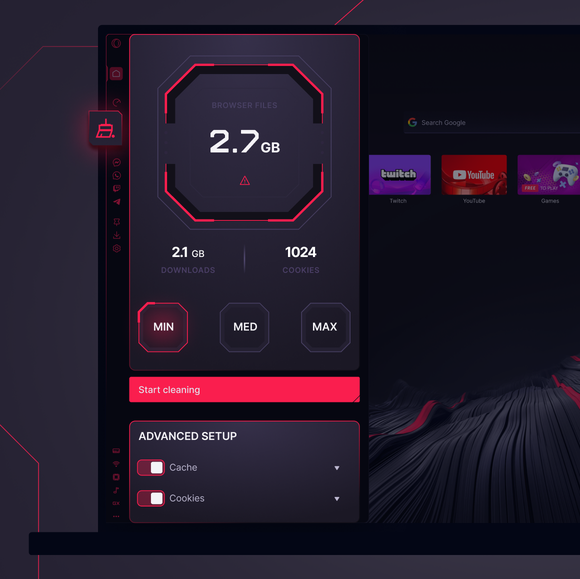
Over time, junk files pile up, dragging down performance and slowing you down. GX Cleaner fixes that. 더 알아보기
GX Cleaner GX Cleaner

Benefits of GX Cleaner

Regular browsers let junk accumulate until your system crawls. GX Cleaner lets you flush out the trash before it becomes a problem.

Clear up useless files

Cache, cookies, old downloads, and browsing history? Gone.

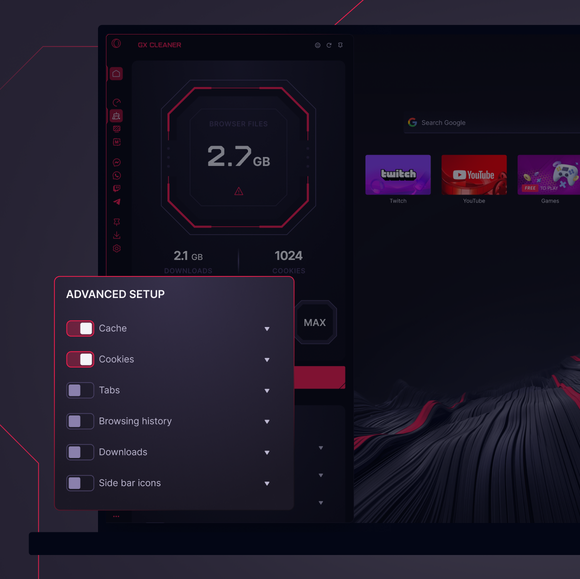
Filter by date & location

Choose exactly what stays and what gets wiped.

Free up browser space

Get rid of unused data and keep GX running like new.

Take control of your data

Customize your cleanup without deleting anything important.

01
Keep your browser 
 p-r-i-s-t-i-n-e Keep your browser 
 p-r-i-s-t-i-n-e

Keep your browser
p-r-i-s-t-i-n-e

GX Control

Boost frames, not fan speed, with CPU and RAM limiters.

GX Mods

Completely customize your GX browser.

Integrated Twitch

Stream on. Twitch lives right in Opera GX.

Integrated Discord

Stay connected to your squad at all times.

Ad Blocker

Your time is epic. Get to the stuff that matters, quicker.

Snapshot

Frame it, capture it, and move on easily.

YouTube Music

화면에 표시되는 모든 콘텐츠를 위한 사운드트랙.

음악 플레이어

좋아하는 모든 음악과 팟캐스트를 한곳에 모아보세요.

Apple Music

Listen to your favorite tracks while you browse.

Spotify

Fuel your browsing with your favorite tunes.

Deezer

Music right where you work (and play).

Tidal

Find your sound. Get inspired with Tidal.

키보드 소리

탭할 때마다 사용자 지정 키보드 소리가 나옵니다.

GX Corner

Games, releases, news and deals in your corner.

블루스카이

Opera GX 브라우저에서 블루스카이.

Slack

전환이 줄어듭니다. 더 많은 일을 하세요. 이제 GX에서 여유를 가지세요.

메신저

더 많은 일에 집중하는 동안 DM은 계속 열려 있습니다.

텔레그램

게임에서 나가지 않고 DM으로 이동합니다.

Browser Profiles

Profiles of each of your personalities.

브라우저에서 X

경기 중에도 탭 전환 없이 트윗할 수 있습니다.

메신저

게임 시작, 채팅 시작! 탭하지 않고 대화하세요.

Video Popout

Watch in a floating video window while you browse.

Bookmarks

Your favorite spots, remembered and ready.

WhatsApp

탐색하는 동안 대화를 계속 진행하세요.

인스타그램

릴과 게시물을 놓치지 않고 스크롤하세요.

VKontakte

게임, 검색, 스트리밍을 하는 동안 VK에서 채팅하세요.

TikTok

재생, 편집 또는 탐색하는 동안 Tiktok을 정주행하세요.

Pinboards

Pin it, plot it, post it. Grab and stash your gems.

게임 거래 애그리게이터

플레이하는 곳에서 바로 인기 게임 할인을 빠르게 받아보세요.

Release Calendar

Never miss out on new game drops.

Split Screen

Double the view, half the mess in GX.

Tabs

Group and control your tabs with zero tabxiety.

Mac용 무료 VPN

GX가 설치된 Mac 장치에서 비공개로 탐색하세요.

Windows용 무료 VPN

무료 VPN으로 Windows에서 비공개로 브라우징하세요.

Browser Games

Turn your browser into your playground.

Game Trailers

See upcoming games, straight from the source.

Custom Cursors

Make every click unmistakably yours.

탭 아일랜드

탭 과부하가 걸리나요? 탭 섬으로 과부하를 해결하세요.

오페라 번역

해당 언어로 된 모든 사이트를 읽어보세요.

탭 이모티콘

탭에 나만의 감각을 더하세요.

Personal News

Get important news right in your sidebar.

GX Network Limiter

Control your GX browser’s bandwidth.

Live Wallpapers

Ditch the dull. Inject some life into your desktop.

Shaders

Apply visual filters across all websites.

Background Music

Silence is boring. Dynamic music adapts to you.

Force Dark Pages

Dim the lights, turn up the style.

Fake My History

Replace your guilty pleasures with wholesomeness.

RGX Mode

Free your eyes from mediocrity with HD visuals.

Panic Button

F12 to purge. Keep your secrets in one click.

Battery Saver

You’ve got the power. Opera GX extends your battery life.

Workspaces

Tab groups. Switch between different contexts in a jiffy.

Flow

모든 장치에서 파일, 링크, 생각을 공유하세요.

무료 VPN

타협 없는 프라이버시, 조건 없는 프라이버시.
01

How often should I clean my browser data?

It really depends on your usage, but a good rule of thumb is to give your browser a quick cleanup every few weeks or at least once a month. If you use your browser heavily – visiting a variety of websites, streaming, gaming, etc. – you might notice sluggishness sooner, which signals it’s time to clear out the clutter. Regular cleanups help maintain responsiveness and keep everything running smoothly.

What’s the difference between Min, Med, and Max cleaning in GX Cleaner?

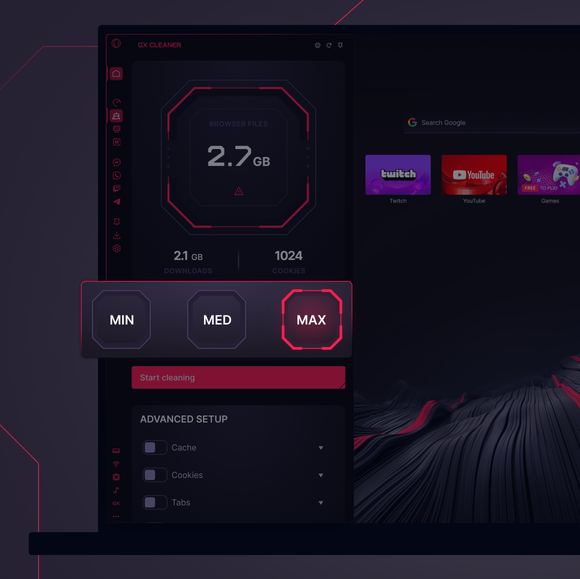
Think of these cleaning levels as different sweeps of your browser’s stored data:

  • Min Cleaning: This is a light touch – ideal for when you just need to remove temporary files like the latest cache or a handful of cookies. It keeps most of your browsing history intact while getting rid of the most recent junk.

  • Med Cleaning: A balanced approach that digs a bit deeper. It not only clears out the latest temporary files but also targets some older data that might be slowing things down, while still preserving useful information.

  • Max Cleaning: The full reboot. This option wipes out nearly everything—cache, cookies, history, downloads, and more. It’s best when you want to start fresh or if your browser’s performance has noticeably dipped.

How do I clean up browser data for a specific time period?

To clean up specific browsing data for a specific period, you can use the Advanced Setup options. Click the dropdown arrow next to the type of data you want to clear, and select the time period from the menu there.

GX Cleaner’s strength is in its flexibility. If you’re doing routine maintenance, you might set it to clear data that’s more than a week or a month old – this keeps recent activity untouched while getting rid of the buildup. However, if you haven’t cleaned in a while or if your browser is really bogged down, you might opt to clear everything. Ultimately, choose a time frame that fits your browsing habits – whether that’s a weekly trim or a monthly deep clean – to keep your system running at its best.

더 좋은 브라우저를 사용할 권리가 있습니다

무료 VPN, 광고 차단 및 전송 기능 - Opera에 내장된 몇 가지 필수 기능으로 더 빠르고 원활하며, 방해 없는 브라우징이 가능합니다.

더 좋은 브라우저를 사용할 권리가 있습니다 더 좋은 브라우저를 사용할 권리가 있습니다